This is the blog section. It has two categories: News and Events.
This is the multi-page printable view of this section. Click here to print.
Blog
- News
- UWB nodes position change In Toulouse
- New UWB nodes and board available on the Toulouse site
- Add 20 dwm1001 nodes in Strasbourg site
- Events
News
UWB nodes position change In Toulouse
Work is in progress in Toulouse site
UWB nodes position change In Toulouse.
Following the installation of 46 new nodes, more work is coming in Toulouse :
- Some nodes will be slightly moved.
- A new ground truth will be measured and published
Several dwm1001 nodes were initially fixed to furniture which, with time, has created contradictory needs in an active office building :
- These furniture items should not be moved to maintain testbed reproducibility and an accurate ground truth
- It is sometimes required to move them (change in the floorplan, need to reach a socket behind a cabinet, …)
To solve this, they will be mounted on the ceiling. We will attempt to put them as close as possible to their previous position but the mounting points cannot be installed arbitrarily, therefore there will be some change in their position on the XY plane (at most 35 cm). We will however set them at the same height.
The following dwm1001 nodes will be impacted : 1, 2, 5, 6, 9, 10, 62, 69, 70, 77, 81, 85, 89, 93, 94. These changes will occur over the coming weeks, starting today with nodes 69 and 70.
Because these dwm1001 nodes will move and we have recently installed new dwm3001 nodes, we will re-measure the ground truth. Since we now have access to a 3D LIDAR scanner, this new ground truth will have a 1mm accuracy over the whole building. The old node positions will be removed on the iot-lab website and on the MQTT broker as soon as the nodes are moved, and they will be updated as soon as the new ground truth is available.
New UWB nodes and board available on the Toulouse site
Toulouse site provides 46 new UWB nodes.
New UWB node deployment in Toulouse.
We are very happy to announce that new UWB nodes and boards are available on the Toulouse site :
- 4 Qorvo DWM1001C boards have been deployed in an anechoic chamber.
- 42 new Qorvo DWM3001 boards have been deployed in the same environment as the previous DWM1001C (38 in an office setting, and 4 in an anechoic chamber).
These new nodes are already available in our production environment, you can start experimenting with them as soon as you wish.
The positions of the new nodes are not yet known. A 3D LIDAR scan of the whole floor with sub-cm accuracy is scheduled in the coming weeks to establish a reliable ground truth for ranging, localization and time synchronization experiments.
Add 20 dwm1001 nodes in Strasbourg site
Strasbourg site provides a new cluster of 20 embedded devices based on Dwm1001 board.
Overview of new Dwm1001 deployment in strasbourg.
The dwm1001 board available are Qorvo (formerly Decawave) DWM1001-DEV boards. They are build around a DWM1001C module which contains a nRF52832 ARM CortexM4 microcontroller from Nordic with BLE and a DW1000 UWB (Ultra-Wide Band) transceiver.
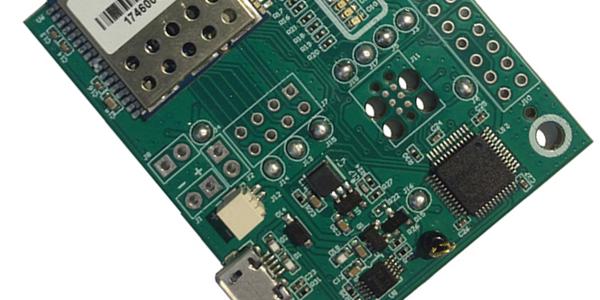
Dwm1001 Board by Qorvo
Photo: Guillaume Schreiner / CC-BY-CA
The dwm1001 board can reset, debug and program the ARM Cortex M4 through the embedded debugger (JLink) connected to the gateway USB port. This component also allows a UART connection to the M4.
Events
SLICES-FR Summer School 2025
First SLICES-FR Summer School @Lyon, 2025
The first SLICES-FR School will be held in Lyon from July 7 to 11, 2025. The detailed program is available here. During the school, numerous sessions dedicated to tutorials will enable participants to discover the equipment and services offered by the SLICES-FR infrastructure, and on a wider scale SLICES-RI. To save time, we have listed the prerequisites for the tutorials below.
School participant’s computer
Participants should bring their own laptop. Wi-Fi network will be available (using Eduroam or guest network).
To save time during the tutorials, we invite you to prepare your computers with the following software:
- A Linux/Mac OS (or Windows WSL, not recommended) shell terminal
- An SSH client and an SSH public key in openssh format
- A text editor
- Web browser compatible with Jupyter Notebook
- Python3 and pip
Some tutorials require additional software:
- Slices-RI Basic Infrastructure : optionnally Docker and Docker compose
- Ariel OS:
SLICES and precursors infrastructures access accounts
It is also recommended to create your accounts on the various platforms in advance.
SLICES-RI
- Follow Request a Slices account proceeding and ask to join slices-fr-school-2025 project (valid until 31/7/2025) via :
G5K
Add a line with your first name, last name and email address to this note: https://notes.inria.fr/6l2osIvoRrSkHHJSATIW6g#
Your account will be created just before the begining of the school.
IoT-LAB
Follow User Account proceeding
CortexLab
Fill account creation form at https://xp.cortexlab.fr/app/signin